I'm an Owl City fan, i love happy and saddest songs. Now, I'm becoming a "He is We" fan also after hearing this song.
This is bad, really bad. But, you can download it here.
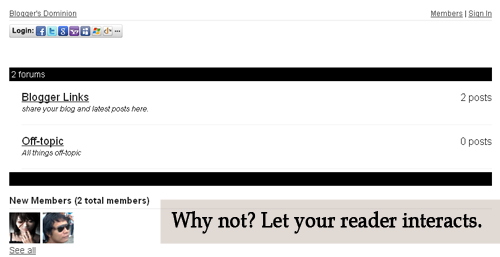
Let's see how it look like first. Is it good? Now, see it live. Click here . Then click the Forum Tab , wait 'til it loads. How to do it? Actually, it's very easy. 1. Just go to this site and sign-up. 2. Then go to your Blogger Dashboard > Edit Posts or New Posts > Edit Pages > Create New Page. 3. Name your page as Forum or anything you want. 4. Click Edit HTML 5. Paste the script that is given by tal.ki. The script looks like this. <script src='http://j9tjfgzo57.embed.tal.ki/embed/1.js' type='text/javascript'/><div id='j9tjfgzo57t4lk1prm0' style='font-size:80%; text-align:center;'>get your own <a href='http://tal.ki?utm_source=install&utm_medium=link&utm_campaign=get_your_own'>embeddable forum</a> with Talki</div> 6. Preview, if it's fine. Publish it! That's it!
This is my base on my personal thoughts. So let's start. 1. How to remove or hide Navbar in Blogger? #navbar-iframe { height:0px; visibility:hidden; display:none; Paste the code above before ]]></b:skin> or under Blogger Template Style Name:**** Designer: **** URL:**** Date: ***** Updated by: Blogger Team ----------------------------------------------- */ credits goes to Blogbulk.com 2. Adding Related Articles on your Post <!--Related Posts Scripts and Styles Start--> <!--Remove--><b:if cond='data:blog.pageType == "item"'> <style type='text/css'> #related-posts { float:center; text-transform:none; height:100%; min-height:100%; padding-top:5px; padding-left:5px; } #related-posts .widget{ padding-left:6px; margin-bottom:5px; } #related-posts .widget h2, #related-posts h2{ font-size: 16px; font-weight: bold; color: #343434; font-family: "Trebuchet MS", ...
Hate Facebook Timeline? Here are the steps which is so simple. Hahaha If you don’t like the new Timeline feature on Facebook and want to view profiles in the old style, then TimelineRemove is the perfect extension for you. This tiny, but handy tool disables the new Facebook timeline feature and restores the classic look, without changing the timeline behavior for other visitors of your Facebook profile. The extension basically works by hiding the timeline, so you can view your own and others’ profiles in the old style. TimelineRemove works automatically once installed, and a button is added to the toolbar that lets you toggle the timeline on and off, whenever you want. 1. Go to this site. 2. Just install the extension as stated on the website page. The problem with this is, you need to install the extension on every browser you have e.g. Firefox, Chrome. Actually, your Facebook Profile is still on Timeline if you view it on the browser that doesn't have th...



Comments
Post a Comment
Feel free to ask, suggest and comment regarding this post/blog. You can also contact me through e-mail, just always use the contact page. Thank you for visiting this blog.