So, you have a twitter now? If you don't have it then this will be impossible to do. haha
Seriously, sign-up! It's free. :D
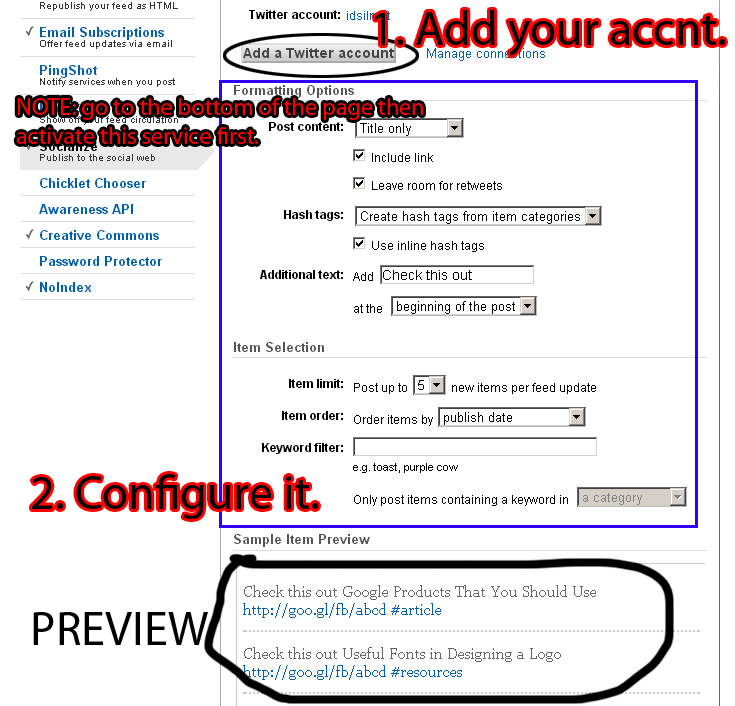
On the serious side, Twitter and Facebook is popular today and so with blogging. What we are going to do is automatically tweet you new blog posts. Less hassle, and less effort on you side. You don't need to log-in to your Twitter account, each time you want to share your new blog posts to your followers.
Here's how to do it:
1. Log in to FeedBurner then burn your rss feed. If you don't know how, check this video.
Don't finish the video just until 1:20sec.
2. After creating your FeedBurner Feed just follow the instruction on the images (click the images if you can't read it clearly)
Feel free to ask, suggest and comment regarding this post/blog. You can also contact me through e-mail, just always use the contact page. Thank you for visiting this blog.
I’m not talking about the pre-made template by blogger (eg. Simple, Picture Template) coz’ it can be customize easily. Let’s focus on the html part. Before touching your code, download you template first for the reason that if you messed up your code, you can easily turn it back like before. How to do it: From Dashboard or Home > Design > Edit HTML then follow this step.
So cute and a very talented person. Some of her songs are "Find My Way Back Home", "Lullaby" & my favorite "Dream". Videos: Her latest song: She even made a song for Japan. Check out her YouTube: [CLICK HERE] :)
What I mean about the easiest way, is no JavaScript , no sign-up, no PHP codes and it loads very fast. Nah, here's the demo showing it. Demo Well, I've been quite since I'm busy at school. This would be my last post in February. Let's do this: First, from Dashboard > Template > Edit HTML then find, <data:post.body/> Then paste this code below or above it: <span class='post-counter'> Post Views: <img height='25' src='http://counters.branica.com/?i= 2 & u=false &ox=10&oy=17&c=000000&b=transparent.png&f=Terminator.ttf& fn=false &w=110&h=25&s=10' style='border: 0px; margin-bottom: -8px; margin-left: 0px; margin-top: -5px; padding: 0px;' width='110'/> </span> Then Save it. Customization: Post Views: - change the text with your preference. 2 - change it with your preferred initial count, number...
Yes, Twitter and Facebook is indeed great places to share content! And this is a really great tip. Thank you for sharing it. :-)
ReplyDelete